dsh-free-search
DeepSeek Harness 免费搜索插件 —— 无需 API key,零成本,多引擎可切换。 一个给 DeepSeek Harness (dsh) 添加多引擎搜索 provider 的插件,注册进 ctx.web seam。内置 web_search 工具自动选用,支持网页设置页切换引擎、配置 API key、一键测试所有引擎、弹出式命令切换引擎。
中文
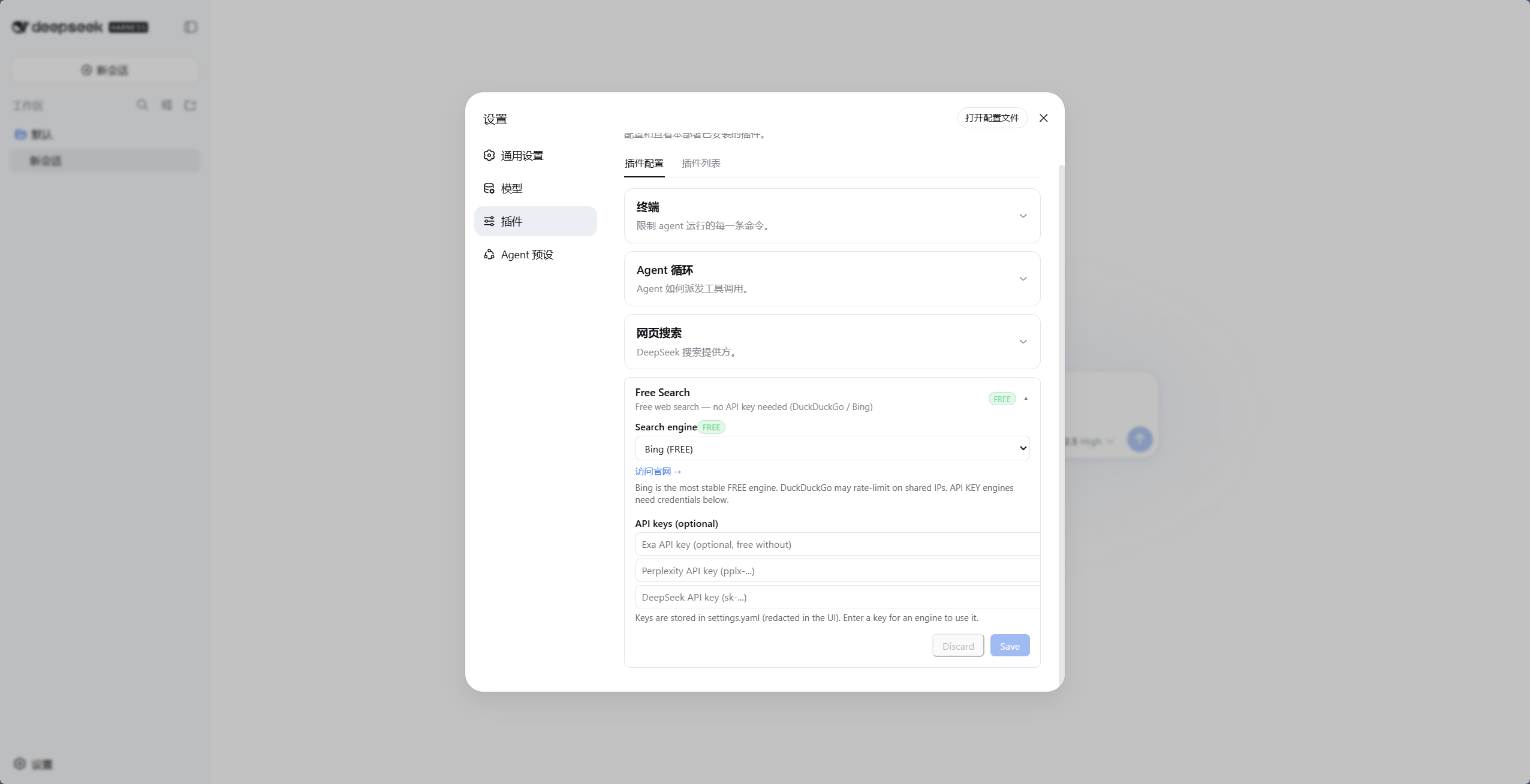
▲ 免费引擎(以Bing为例)
为什么需要它
dsh 默认的搜索 provider 依赖 DeepSeek 官方 API key(DEEPSEEK_API_KEY)。如果你:
- 没有(或不想用)DeepSeek 官方 key,
- 用的是 opencode-go 这类网关(其 OpenAI 兼容端点不支持
web_search工具),
……那么内置搜索必然失败,agent 会告诉你"无法联网"。
这个插件提供多个免费引擎 + 自动回退,彻底摆脱 DeepSeek 官方 key 的依赖。
特性
- 零成本 —— 多个免费引擎,无需 key、无需注册
- 多引擎可选:DuckDuckGo(html/lite)、Bing、SearXNG(元搜索,支持自定义实例)、AnySearch、Exa、Tavily、Keenable、Perplexity、DeepSeek 官方
- 网页设置页 —— 引擎切换 + API key 配置(UI 中 key 脱敏显示"已配置")+ 中英文切换
- 弹出式切换命令 —— 聊天框输入
/free-search-engine,弹出引擎选择窗口,点选即切换(等效设置页 + 保存) - 引擎测试 ——
free_search_test工具让 agent 一键测试所有引擎;设置页也有"测试引擎"按钮(直测当前引擎,不走回退链,付费引擎无 key 会明确报错) - 统一引擎回退 —— 任何引擎失败(付费/免费,缺 key/401/限流/网络)自动轮流尝试下一个引擎:先试其他已配 key 的付费引擎,再试免费引擎,搜索永不直接失败
- 时间过滤 ——
advanced_search工具支持timeRange:固定档、自定义相对值、绝对日期三种形式(详见下方逻辑说明) - 系统提示词注入 —— agent 知道当前用哪个引擎、哪些需要 key
- 免费标注 —— 设置页中免费引擎带绿色
FREE徽章,付费引擎带橙色API KEY徽章 - 网页抓取(web_fetch) —— 让 agent 抓取网页内容(官方
dsh-web-fetch-httpprovider,纯 JS,零额外依赖) - 平台搜索(platform_search) —— 搜 GitHub / V2EX / B站(公开 API,零依赖)
- 干净集成 —— 实现官方
WebSearchProviderseam 接口,与官方插件共存
引擎列表
| id | 引擎 | 费用 | 说明 |
|---|---|---|---|
ddg |
DuckDuckGo HTML | 免费 | 偶发限流(反爬),解封自动恢复 |
ddg-lite |
DuckDuckGo Lite | 免费 | 轻量版,同上 |
bing |
Bing | 免费 | 默认引擎,最稳定,中文优化(zh-CN) |
anysearch |
AnySearch AI | 免费 | AI 搜索,无 key(匿名额度) |
searxng |
SearXNG 元搜索 | 免费 | 多实例自动切换,支持自定义实例 |
exa |
Exa | 免费 | 无 key 也可用(MCP 匿名),配 key 提升额度 |
tavily |
Tavily | 免费 | 无 key 也可用(keyless 匿名),配 key 提升额度 |
keenable |
Keenable | 免费 | 无 key 也可用(MCP 匿名),配 key 提升额度 |
perplexity |
Perplexity | 付费 | 需 PERPLEXITY_API_KEY |
deepseek-official |
DeepSeek 官方 | 付费 | 需 DEEPSEEK_API_KEY |
- 默认引擎为
bing(免费且最稳定),安装后开箱即用。 - 自动回退:任何引擎失败(免费限流/反爬,付费缺 key/无效/网络错误)都会自动轮流尝试下一个引擎——先试其他已配 key 的付费引擎,再试免费引擎(Bing/AnySearch 等),并在结果中附带回退提示——搜索不会因引擎问题直接失败。
- 设置页有官网链接:免费引擎显示"访问官网 →",付费引擎显示"获取 API Key →"(新标签页打开):
- Exa:https://dashboard.exa.ai/api-keys
- Tavily:https://app.tavily.com/home
- Keenable:https://keenable.ai/login
- Perplexity:https://www.perplexity.ai/settings/api
- DeepSeek:https://platform.deepseek.com/api_keys
为什么免费引擎不需要 key?
- AnySearch:其
v1/searchREST 接口提供匿名的公共搜索额度,无需注册或 API key。额度有限流(适合日常搜索),但作为免费引擎之一,与其他免费引擎互相回退,体验稳定。 - Exa:公开 MCP 端点(
mcp.exa.ai/mcp)支持匿名调用,不配 key 也能用;配置EXA_API_KEY后可获得更高额度。 - Tavily:通过
x-tavily-access-mode: keyless头走 keyless 匿名额度,不配 key 即可用;配置TAVILY_API_KEY后走账号档,额度更高、结果质量更稳定。 - Keenable:无 key 时走其公开 MCP 端点(
api.keenable.ai/mcp)匿名调用;配置KEENABLE_API_KEY后走 REST API(api.keenable.ai/v1/search),额度更高、按组织限流。
安装
git clone https://github.com/DDDMUC/dsh-free-search.git
dsh plugin --profile web add /path/to/dsh-free-search
然后重启:
dsh web
依赖说明
插件对 @deepseek-ai/dsh-settings 和 @deepseek-ai/dsh-tools 使用 peerDependencies,这是刻意的:DSH 运行时必须使用安装树中的唯一实例。请通过 dsh plugin --profile <profile> add ... 安装插件,不要把 DSH 核心包复制进 profile 的本地 node_modules;重复副本会导致工具调度器失效。
使用
网页设置(推荐)
安装后,打开 设置 → 插件 → 可配置 标签页 → Free Search 卡片(官方设置页):
- Search engine:下拉框切换引擎,保存即生效
- API keys:为 Exa / Tavily / Keenable / Perplexity / DeepSeek 填写 key(密码框,保存后只显示"已配置")
- Test engine:直测当前引擎可用性(不走回退链,付费引擎无 key 会明确报错)
- Use Bing default:把当前搜索引擎切回稳定的免费 Bing;
Discard只撤销尚未保存的编辑 - Platform search:勾选启用 GitHub / V2EX / Bilibili 平台搜索(
platform_search工具按此过滤) - EN / 中文:切换界面语言(默认中文)
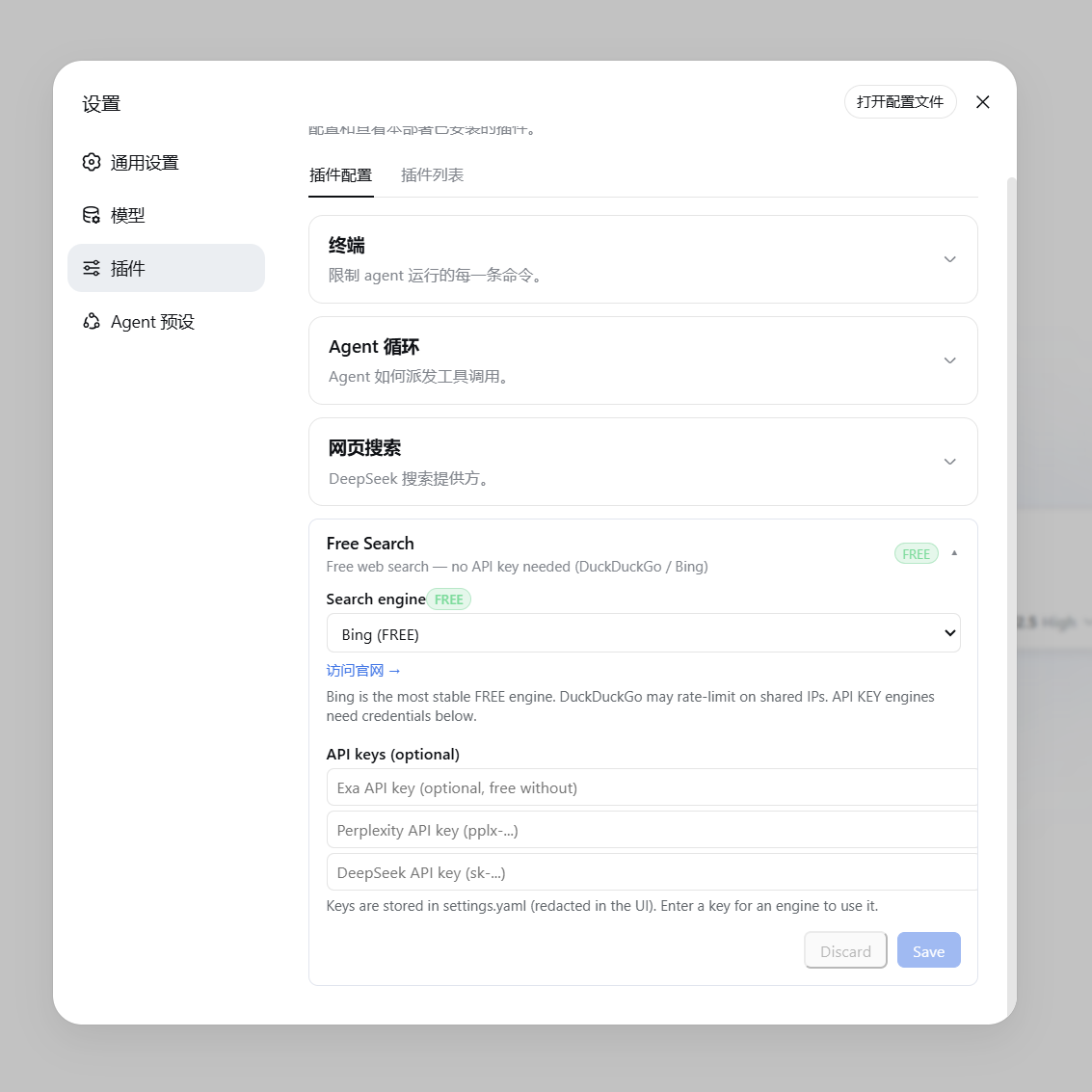
▲ 免费引擎(显示绿色 FREE 徽章与官网链接) |
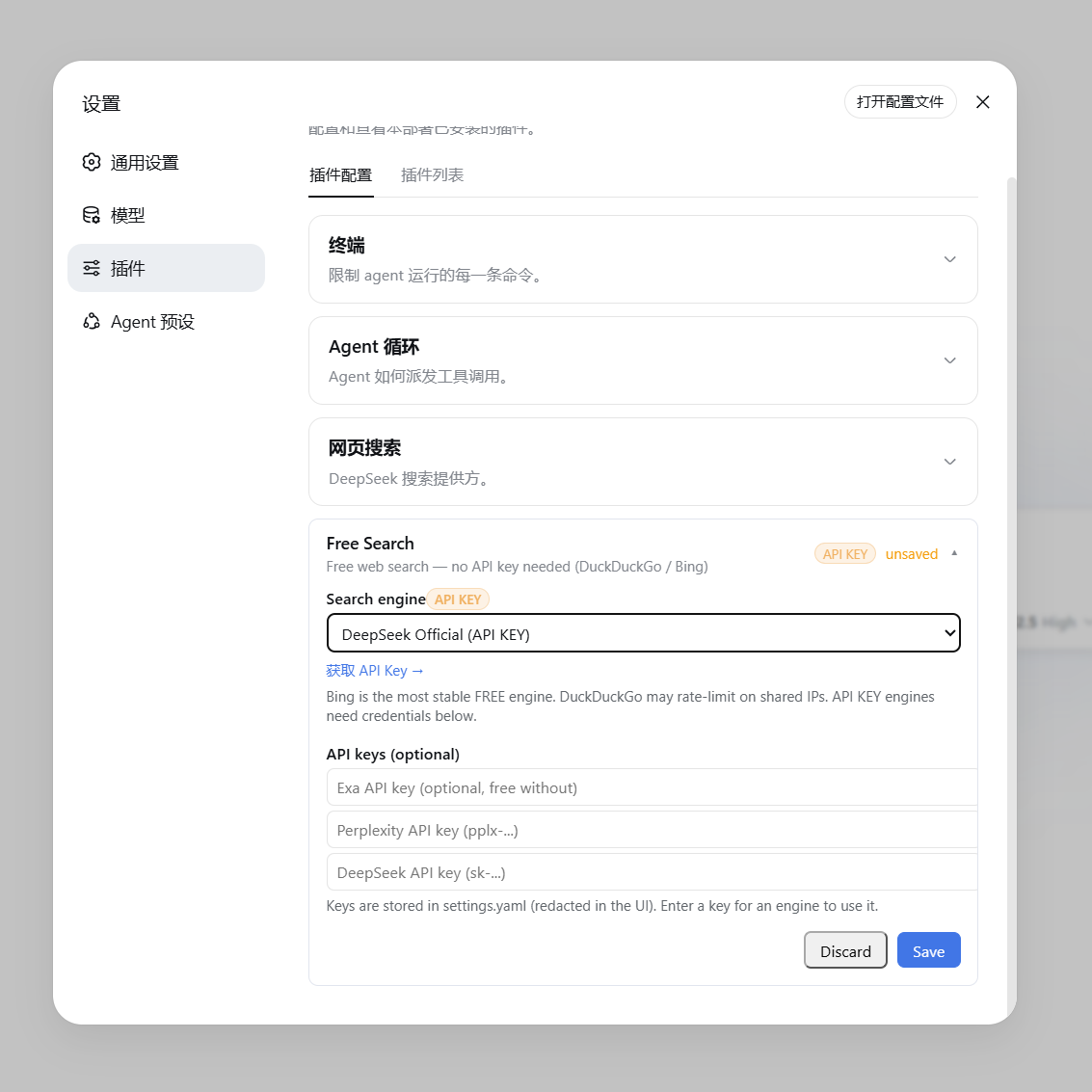
▲ 付费/API Key 引擎(显示橙色 API KEY 徽章与获取链接) |
聊天框切换引擎(/free-search-engine)
不用进设置页也能切换引擎:在聊天框输入 /free-search-engine,弹出引擎选择窗口(和 /model 选模型一样的交互),点选即切换,当前引擎会标记出来。等效于设置页切换 + 保存,且界面语言跟随设置页(中文/英文)。
命令只改首选引擎配置,搜索仍走 web_search + 统一回退链:即使首选引擎挂了也会自动换其他引擎,永不直接失败。系统提示词同步刷新。
配置文件
配置存在 ~/.dsh/settings.yaml:
free-search:
  provider: bing              # ddg / ddg-lite / bing / searxng / anysearch / exa / tavily / keenable / perplexity / deepseek-official
  lang: zh                    # 设置页界面语言(zh / en)
  bingMarket: zh-CN           # Bing 市场
  region: cn-zh               # DuckDuckGo 区域(可选)
  searxngInstances:           # 自定义 SearXNG 实例(可选)
    - https://your-instance.example
  exaApiKey: ...              # 或通过设置页填写
  tavilyApiKey: ...           # 或通过设置页填写
  keenableApiKey: ...         # 或通过设置页填写
  perplexityApiKey: ...
  deepseekApiKey: ...
让 agent 测试所有引擎
对 agent 说"测试一下所有搜索引擎",它会调用 free_search_test 工具,逐个测试并报告:
Search engine test:
- ddg: FAIL - DuckDuckGo is rate-limited right now (anti-bot challenge, usually temporary) - Bing works
- bing: OK (2 results, e.g. "DeepSeek Harness developer preview...")
- exa: FAIL - EXA_API_KEY not configured
时间过滤(advanced_search)
让 agent 搜"最近一周的新闻"、"这个月的发布"、"最近 3 天的消息"、"7 月以来的更新",它会调用 advanced_search 工具,带 timeRange 参数。该工具同样走统一回退链,且可显式指定 engine,返回结构同 web_search。
timeRange 支持三种形式:
| 形式 | 示例 | 含义 |
|---|---|---|
| 固定档 | day / week / month / year |
分别 = 1 / 7 / 30 / 365 天 |
| 自定义相对值 | 12h、3d、2mo、1y |
最近 12 小时 / 3 天 / 2 个月 / 1 年 |
| 绝对日期 | 2026-07-01 |
该日期(含)之后发布的结果 |
各引擎对 timeRange 的处理逻辑:
| 引擎 | 参数 | 是否精确 | 说明 |
|---|---|---|---|
| Exa | startPublishedDate |
✅ 精确 | 自定义天数转成 ISO 日期(N 天前),绝对日期原样传入 |
| Keenable | published_after |
✅ 精确 | 相对值原样传(12h/3d/2mo/1y),绝对日期原样传 |
| Tavily | time_range |
⚠️ 近似 | 只认固定档,自定义天数自动映射到最近似档位 |
| SearXNG | time_range |
⚠️ 近似 | 同上 |
| DuckDuckGo / Lite | df |
⚠️ 近似 | 同上 |
| Bing / AnySearch | — | ❌ 忽略 | 无对应参数 |
"最近似档位"映射规则:≤2 天 → day,≤14 天 → week,≤90 天 → month,否则 year。例如 3d 在 Tavily 上按 day 处理,2mo 按 month 处理。
引擎链优先级:当带 timeRange 搜索时,支持时间过滤的引擎(tavily / exa / keenable / searxng / ddg / ddg-lite)会排到引擎链前面,确保过滤真正生效——即使首选引擎是 bing(不支持过滤),也会先尝试支持过滤的引擎。
示例对话:"帮我搜最近 3 天关于 DSH 的新闻" → agent 调用 advanced_search,timeRange: "3d"。
抓取网页内容(web_fetch)
搜索到 URL 后,可以让 agent 读取网页全文(如"打开第一个链接看看内容")。web_fetch 工具已启用(官方 dsh-web-fetch-http provider):
- 自动跟随重定向、解码正文(HTML 转文本)
- 支持超时和大小限制
- ⚠️ 注意:
web_fetch无 SSRF 防护,agent 理论上可访问内网地址——按需使用
平台搜索(platform_search)
让 agent 搜特定平台,如"在 GitHub 上搜 deepseek harness"、"看看 B站有什么相关视频"、"V2EX 上关于 dsh 的讨论"。platform_search 工具支持:
| 平台 | 用途 |
|---|---|
github |
GitHub 仓库搜索(API,免费无 key) |
v2ex |
V2EX 热门/相关主题 |
bilibili |
B站视频/内容搜索(公开接口) |
全部走公开 API,零外部依赖,开箱即用。
本地引擎切换工具(tools/)
tools/ 目录附带了一个本地切换小工具(零依赖):
启动搜索引擎切换器.cmd(Windows)——双击启动本地 Node 服务(http://127.0.0.1:4789)并自动打开浏览器选择页面switch-engine.html—— 选择页面:显示当前引擎,点选新引擎,一键写入配置server.mjs—— 本地服务,负责读写~/.dsh/profiles/web/cordis.patch.ymlswitch-engine.ps1—— 无界面命令行版:powershell -File tools/switch-engine.ps1 -Engine bing
切换后重启 dsh web 生效。
配置卡片挂在官方设置页的
settings.plugin.item插槽(dsh 自带),配置读写走插件自建 bridge,不依赖 dsh-web-ui,插件可独立使用。
代理说明(国内用户)
DuckDuckGo 等引擎可能需要代理才能访问,而 Node.js 的 fetch 默认不走系统代理。需要给 dsh 进程设置(Node 24+):
export NODE_USE_ENV_PROXY=1
export HTTPS_PROXY=http://127.0.0.1:7897   # 你的代理地址
export HTTP_PROXY=http://127.0.0.1:7897
Windows 用户:桌面快捷方式已内置此配置(set NODE_USE_ENV_PROXY=1&& set HTTPS_PROXY=...)。
工作原理
lib/index.js:host 端。实现WebSearchProvider(id/available()/search()),统一引擎路由 + 自动回退(付费引擎优先,免费兜底);解析timeRange(固定档/相对值/绝对日期)并透传给各引擎;注册free-searchsettings namespace;提供/api/dsh-free-search-settings读写桥 +raw-search调试接口;注册free_search_test、platform_search、advanced_search工具;动态注入引擎清单到系统提示词(设置变更时自动刷新)。lib/client.js:浏览器端。React 配置卡片(引擎选择 + key 输入 + 连通测试 + 中英切换),挂载到官方设置页的settings.plugin.item插槽;注册/free-search-engine弹出式切换命令(commandUipopupSelect,与/model同机制)。cordis.patch.yml:插件 loader 配置。
English
▲ Free engine (using Bing as an example)
Why You Need It
dsh's default search provider relies on the official DeepSeek API key (DEEPSEEK_API_KEY). If you:
- Do not have (or prefer not to use) an official DeepSeek key,
- Use a gateway like opencode-go (whose OpenAI-compatible endpoint does not support the
web_searchtool),
...then the built-in search will inevitably fail, and the agent will tell you "I cannot access the internet."
This plugin provides multiple free search engines with automatic fallback, completely freeing you from relying on DeepSeek's official key.
Features
- Zero Cost — Multiple free engines with no API key or registration required
- Multi-Engine Support — DuckDuckGo (HTML / Lite), Bing, AnySearch AI, SearXNG (meta-search with custom instances), Exa, Tavily, Keenable, Perplexity, and DeepSeek Official
- Web Settings UI — Engine switching, API key configuration (keys masked as "configured" in the UI), and a Chinese/English toggle
- Popup Switch Command — Type
/free-search-enginein the chat: a picker opens with all engines; click one to switch (equivalent to the settings page + save) - Engine Testing —
free_search_testfor the agent to check all engines in one call; the settings UI also has a "Test engine" button that tests the selected engine directly (no fallback chain; paid engines without a key report an explicit error) - Unified Engine Fallback — Any engine failure (paid or free, missing key, 401, rate limit, network error) automatically tries the next engine: other paid engines with configured keys first, then free engines. Search never fails outright.
- Time Filtering — The
advanced_searchtool supportstimeRange: fixed tiers, custom relative values, or an absolute date (details below) - System Prompt Injection — The agent is aware of the currently active engine and which engines require API keys
- Visual Badges — Free engines feature a green
FREEbadge, while paid engines show an orangeAPI KEYbadge in the settings UI - Webpage Fetching (
web_fetch) — Allows the agent to read full webpage contents (officialdsh-web-fetch-httpprovider, pure JS, zero extra dependencies) - Platform Search (
platform_search) — Search GitHub / V2EX / Bilibili (public APIs, zero extra dependencies) - Clean Integration — Implements the official
WebSearchProviderseam interface, coexisting seamlessly with official plugins
Supported Engines
| id | Engine | Cost | Description |
|---|---|---|---|
ddg |
DuckDuckGo HTML | Free | Occasional rate limits (anti-bot challenges); recovers automatically |
ddg-lite |
DuckDuckGo Lite | Free | Lightweight version; same rate-limit behavior as above |
bing |
Bing | Free | Default engine, most stable, optimized for Chinese (zh-CN) |
anysearch |
AnySearch AI | Free | AI search, no key needed (anonymous quota) |
searxng |
SearXNG Meta Search | Free | Multi-instance automatic failover; supports custom instances |
exa |
Exa | Free | Usable without a key (anonymous MCP); configure a key for higher quota |
tavily |
Tavily | Free | Usable without a key (keyless anonymous); configure a key for higher quota |
keenable |
Keenable | Free | Usable without a key (anonymous MCP); configure a key for higher quota |
perplexity |
Perplexity | Paid | Requires PERPLEXITY_API_KEY |
deepseek-official |
DeepSeek Official | Paid | Requires DEEPSEEK_API_KEY |
- Default engine is
bing(free and most stable), ready to use out of the box after installation. - Auto-failover: any engine failure (rate-limited free engine, or missing/invalid paid key, network error) automatically tries the next engine — other paid engines with configured keys first, then free engines (Bing/AnySearch etc.) — with a note attached to the results. Search never fails outright because of engine issues.
- Official Links in Settings: Free engines display "Visit Website →", while paid engines display "Get API Key →" (opens in a new tab):
- Exa: https://dashboard.exa.ai/api-keys
- Tavily: https://app.tavily.com/home
- Keenable: https://keenable.ai/login
- Perplexity: https://www.perplexity.ai/settings/api
- DeepSeek: https://platform.deepseek.com/api_keys
Why are some engines free?
- AnySearch: its
v1/searchREST endpoint provides anonymous public search quota without registration or an API key. Quota is rate-limited (fine for daily queries), but as one of the free engines with mutual fallback it stays reliable. - Exa: its public MCP endpoint (
mcp.exa.ai/mcp) supports anonymous requests, so it works without a key; configuringEXA_API_KEYgrants a higher usage quota. - Tavily: offers keyless anonymous quota via the
x-tavily-access-mode: keylessheader — it works without a key; configuringTAVILY_API_KEYswitches to the account tier for higher quota and more stable results. - Keenable: without a key it is called via its public MCP endpoint (
api.keenable.ai/mcp); configuringKEENABLE_API_KEYswitches to the REST API (api.keenable.ai/v1/search) for higher quota and organization-scoped rate limits.
Installation
git clone https://github.com/DDDMUC/dsh-free-search.git
dsh plugin --profile web add /path/to/dsh-free-search
Then restart:
dsh web
Dependency Note
This plugin intentionally specifies @deepseek-ai/dsh-settings and @deepseek-ai/dsh-tools as peerDependencies: the DSH runtime must use a single instance from the installation tree. Always install the plugin using dsh plugin --profile <profile> add .... Do not copy DSH core packages into a profile-local node_modules, as duplicate copies can break the tool scheduler.
Usage
Web Settings (Recommended)
After installation, navigate to Settings → Plugins → Configurable tab → Free Search card (the official settings page):
- Search engine: Select an engine from the dropdown; changes take effect immediately upon saving.
- API keys: Enter keys for Exa / Tavily / Keenable / Perplexity / DeepSeek (password fields; displayed as "configured" once saved).
- Test engine: Tests the selected engine directly (no fallback chain; paid engines without a key report an explicit error).
- Use Bing default: stage a switch back to the stable free Bing engine;
Discardonly cancels unsaved edits - Platform search: check GitHub / V2EX / Bilibili to enable them for the
platform_searchtool (disabled platforms are skipped). - EN / 中文: toggle the interface language (default Chinese).
|
▲ Free Engine (shows green FREE badge and official website link) |
▲ Paid / API Key Engine (shows orange API KEY badge and link to get an API key) |
Switching Engines from the Chat (/free-search-engine)
You can also switch the engine right from the chat — no need to open the settings page. Type /free-search-engine: a picker opens with all engines (the same interaction as /model for selecting a model). Click one to switch; the current engine is marked. Equivalent to switching and saving in the settings page, and the language follows the settings page (Chinese/English).
The command only changes the preferred engine; search still goes through web_search + the unified fallback chain — even if the preferred engine fails, it automatically switches to others, never failing outright. The system prompt refreshes accordingly.
Configuration File
Configuration is stored in ~/.dsh/settings.yaml:
free-search:
  provider: bing              # ddg / ddg-lite / bing / searxng / anysearch / exa / tavily / keenable / perplexity / deepseek-official
  lang: zh                    # settings UI language (zh / en)
  bingMarket: zh-CN           # Bing market
  region: cn-zh               # DuckDuckGo region (optional)
  searxngInstances:           # Custom SearXNG instances (optional)
    - https://your-instance.example
  exaApiKey: ...              # Or configure via the web settings UI
  tavilyApiKey: ...           # Or configure via the web settings UI
  keenableApiKey: ...         # Or configure via the web settings UI
  perplexityApiKey: ...
  deepseekApiKey: ...
Asking the Agent to Test All Engines
Tell the agent "Test all search engines", and it will call the free_search_test tool to check each engine sequentially and report back:
Search engine test:
- ddg: FAIL - DuckDuckGo is rate-limited right now (anti-bot challenge, usually temporary) - Bing works
- bing: OK (2 results, e.g. "DeepSeek Harness developer preview...")
- exa: FAIL - EXA_API_KEY not configured
Time Filtering (advanced_search)
Ask the agent for "news from the last week", "releases this month", "updates from the last 3 days", or "posts since July", and it will call the advanced_search tool with a timeRange parameter. It uses the same unified fallback chain, can force a specific engine, and returns the same shape as web_search.
The timeRange parameter accepts three forms:
| Form | Example | Meaning |
|---|---|---|
| Fixed tier | day / week / month / year |
= 1 / 7 / 30 / 365 days |
| Custom relative | 12h, 3d, 2mo, 1y |
last 12 hours / 3 days / 2 months / 1 year |
| Absolute date | 2026-07-01 |
results published on or after that date |
How each engine handles timeRange:
| Engine | Parameter | Precise? | Notes |
|---|---|---|---|
| Exa | startPublishedDate |
✅ precise | custom days become an ISO date (N days ago); absolute dates pass through |
| Keenable | published_after |
✅ precise | relative values (12h/3d/2mo/1y) and absolute dates pass through |
| Tavily | time_range |
⚠️ approximate | only fixed tiers; custom days map to the nearest tier |
| SearXNG | time_range |
⚠️ approximate | same as above |
| DuckDuckGo / Lite | df |
⚠️ approximate | same as above |
| Bing / AnySearch | — | ❌ ignored | no corresponding parameter |
Nearest-tier mapping rule: ≤2 days → day, ≤14 days → week, ≤90 days → month, otherwise year. For example, 3d becomes day on Tavily, and 2mo becomes month.
Engine-chain priority: when a timeRange is present, engines that support time filtering (tavily / exa / keenable / searxng / ddg / ddg-lite) are moved to the front of the fallback chain, so the filter actually takes effect — even if the preferred engine is bing (which does not support filtering), a filtering-capable engine is tried first.
Example: "Find DSH news from the last 3 days" → agent calls advanced_search with timeRange: "3d".
Fetch Webpage Content (web_fetch)
After searching, the agent can read full webpage content (e.g., "Open the first link and summarize it"). The web_fetch tool is enabled by default (official dsh-web-fetch-http provider):
- Automatically follows redirects and decodes HTML to plain text.
- Supports timeout and response size limits.
- ⚠️ Note:
web_fetchdoes not have SSRF protection; the agent could theoretically access internal network addresses. Use as needed.
Platform Search (platform_search)
Ask the agent to search specific platforms (e.g., "Search GitHub for deepseek harness", "Find related videos on Bilibili", or "Discussions about dsh on V2EX"). The platform_search tool supports:
| Platform | Purpose |
|---|---|
github |
GitHub repository search (public API, free, no key required) |
v2ex |
V2EX hot / relevant topics |
bilibili |
Bilibili video / content search (public API) |
All platform searches rely on public endpoints with zero external dependencies and work out of the box.
Local Engine Switcher (tools/)
The tools/ directory includes a lightweight, zero-dependency switcher:
启动搜索引擎切换器.cmd(Windows) — Double-click to launch a local Node server (http://127.0.0.1:4789) and automatically open the engine selector page in your browser.switch-engine.html— The selector UI: displays current engine status and allows one-click switching.server.mjs— The local backend service responsible for reading/writing~/.dsh/profiles/web/cordis.patch.yml.switch-engine.ps1— Headless PowerShell script:powershell -File tools/switch-engine.ps1 -Engine bing.
Restart dsh web after switching to apply changes.
The settings card mounts into the official
settings.plugin.itemslot (built into DSH), and configuration reads/writes go through the plugin's own bridge. Nodsh-web-uidependency — the plugin can be used standalone.
Proxy Note (for Users in Mainland China)
Engines like DuckDuckGo may require a proxy. Since Node.js fetch does not use the system proxy by default, set the following environment variables for the dsh process (Node 24+):
export NODE_USE_ENV_PROXY=1
export HTTPS_PROXY=http://127.0.0.1:7897   # Your proxy address
export HTTP_PROXY=http://127.0.0.1:7897
Windows users: The desktop shortcut already includes this configuration (set NODE_USE_ENV_PROXY=1&& set HTTPS_PROXY=...).
How It Works
lib/index.js: Host side. ImplementsWebSearchProvider(id/available()/search()), unified engine routing + auto-fallback (paid engines first, free as fallback); parsestimeRange(fixed tiers / relative values / absolute dates) and forwards it to each engine; registers thefree-searchsettings namespace; provides the/api/dsh-free-search-settingsread/write bridge +raw-searchdebug endpoint; registers thefree_search_test,platform_search, andadvanced_searchtools; dynamically injects the engine list into system prompts (auto-refreshes on settings change).lib/client.js: Browser side. React configuration