The web search plugin for DeepSeek Harness, and the search bridge for every model without native web access. Ask the web or X, get structured JSON evidence. | 🥇 全网最强的 DeepSeek Harness 联网搜索插件🥇。为不能联网的模型补上搜索。问网页或 X,拿回结构化 JSON 证据(搜索、抓取、引用)。
Pending human review — the facts below come from the source repository.
What it does
The web search plugin for DeepSeek Harness, and the search bridge for every model without native web access. Ask the web or X, get structured JSON evidence. | 🥇 全网最强的 DeepSeek Harness 联网搜索插件🥇。为不能联网的模型补上搜索。问网页或 X,拿回结构化 JSON 证据(搜索、抓取、引用)。
Who it’s for
Users who want this capability in DSH; check the source and docs before installing.
Risks & caveats
No strong risk signals; still worth a source look before installing.
Install
Review, then install
dsh plugin --profile web add github:liustack/modsearch
Repository facts
TypeDSH plugin
Stars141
Forks6
Open issues1
LanguageTypeScript
LicenseMIT
Last activityAug 17, 2026
Metadata100% complete
StatusPublic
Type note: It is a real DeepSeek Harness web search plugin that installs inside DSH and contributes a search skill, as documented in its README and npm package. · model-classified · Aug 18, 2026
Models like DeepSeek-V4-Flash have no web access, or a weak one. ModSearch is a plug-in that greatly strengthens the model's web search, X search, and single-page fetch. ## Talk to us Something broken, or something missing? [Open an issue](https://github.com/liustack/modsearch/issues/new/choose). For everything else, come find me on X: **[@liustack](https://x.com/liustack)**. What you built with it, which harness you are on, what should come next. New releases land there first, and a proper community space is on the way. ## Features - **🥇 The most powerful web search plugin for DeepSeek Harness (dsh):** one command, `npx -y @deepseek-ai/dsh plugin --profile web add @liustack/modsearch@5.4.3`, and dsh's built-in `web_search` runs on the modsearch engine chain with no API key, keeping its native citation cards. Two tools dsh does not have land beside it: `x_search` for X (Twitter) and `read_page` for focused single-page reading. Updating is the same command again. The version is named rather than `@latest` because pnpm 11 holds back releases published in the last 24 hours and resolves the tag against the older versions that remain. Details in [harness setup](docs/harness-setup.md#deepseek-harness-dsh). - **Completely free.** The default channel is Antigravity CLI, no API key needed. All three fallback channels (Tavily, Exa, Firecrawl) offer monthly free tiers with no card required. - **Automatic failover.** When a channel fails or exhausts its quota, the next one takes over. - **Searches X (Twitter).** With Grok Build installed, ModSearch queries the corpus that web indexes cannot reach. - **Install once, use everywhere.** Works in Claude Code, Codex, Pi, and OpenCode. ## Supported engines Any one of these makes search work. Configure with one command each, keys are stored in `~/.modsearch/config.json` (0600, masked when shown): | Engine | Does | Free tier | Turn it on | | :-- | :-- | :-- | :-- | | Antigravity CLI | web search + page fetch | free, browser sign-in | install `agy` and sign in | | Tavily | web search | 1,000 credits/month, no card | `modsearch config set tavily.apiKey ` | | Exa | web search | $10/month recurring credit (~1,400 searches), no card | `modsearch config set exa.apiKey ` | | Firecrawl | web search + page fetch | 1,000 credits/month, search even works keyless | `modsearch config set firecrawl.apiKey ` | | Grok Build | X (Twitter) search | rides SuperGrok or X Premium | install `grok` and sign in | | local | page fetch | built in, nothing to install | nothing | Keys can also come from the environment (`TAVILY_API_KEY`, `EXA_API_KEY`, `FIRECRAWL_API_KEY`). Multiple engines configured means automatic failover, best first. Using a Tavily-, Exa-, or Firecrawl-compatible third-party or self-hosted endpoint? Point the engine at it: `modsearch config set tavily.baseURL `. Every knob, engine by engine, is in the [configuration guide](skills/modsearch/references/configure.md). ## Installation **Step 1, set up a search engine (the only part that needs your hands).** The default engine, Antigravity CLI, requires a browser sign-in that only you can complete: ```bash curl -fsSL https://antigravity.google/cli/install.sh | bash agy # sign in, then exit ``` Prefer not to install it? Register a free key with Tavily, Exa, or Firecrawl instead (Tavily 1,000 credits a month, Exa about 1,400 searches a month, Firecrawl 1,000 credits a month, no card required by any of them). **Step 2, hand the rest to your AI.** Send it this line, along with the key if you chose one: > Install and configure the modsearch skill following https://github.com/liustack/modsearch/blob/main/INSTALL.md, then run the health check and tell me the result. ## Usage Once installed, just chat. Ask anything that needs checking, or paste a URL, and the skill triggers on its own: it picks an engine, runs the search or fetch, and the answer comes back with sources. ## See it work Both screenshots are unedited runs from the Codex desktop app, driving a DeepSeek-V4-Flash that has no web access of its own. Give it a blog link and ask what the post says. Twenty-five seconds later: a structured summary of the whole post, with no browser involved.  Give it no target at all, just "anything interesting in AI today?". Thirty-six seconds later: six sourced stories, with a closing note on which details came from aggregation and deserve a second look. The note comes from the `uncertainty` field. 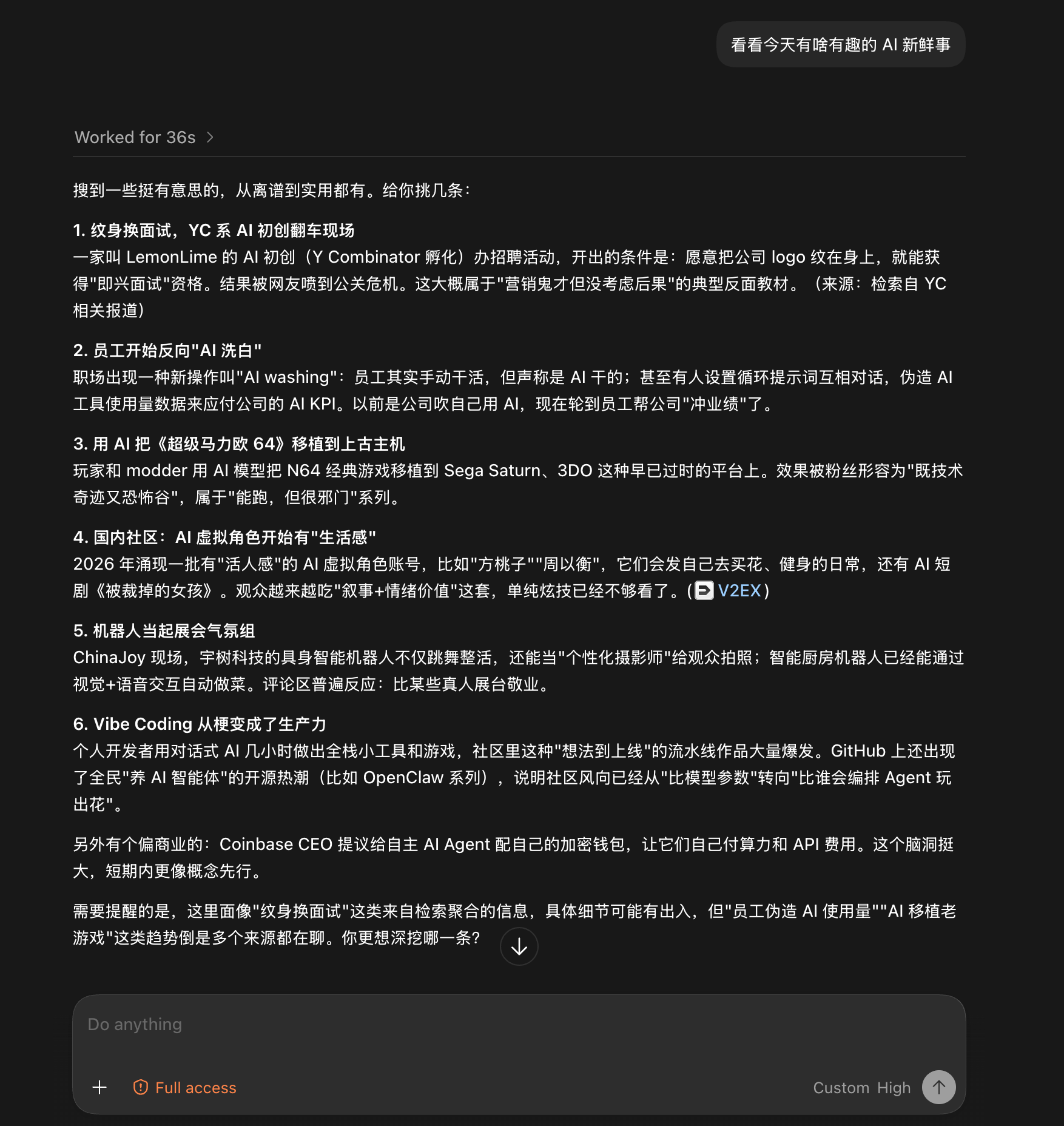 ## Documentation | Doc | Read it when | | :-- | :-- | | [INSTALL.md](INSTALL.md) | Installing the skill step by step (written for an agent) | | [CLI manual](skills/modsearch/references/cli.md) | The CLI the skill drives: flags, config, doctor | | [Troubleshooting](docs/troubleshooting.md) | A command failed and the message needs decoding | | [Configuration](skills/modsearch/references/configure.md) | Setting a key, switching engines, fixing config | | [Output contract](skills/modsearch/references/output-schema.md) | Parsing the JSON or building on it | | [Harness setup](docs/harness-setup.md) | Wiring it into Codex, Claude Code, OpenCode, or Pi | | [Security](docs/security.md) | SSRF guards, DNS-rebinding protection, untrusted input | | [CHANGELOG](CHANGELOG.md) | Finding what changed in a version | ## Contributing ModSearch does not accept pull requests. The project is maintained by a single author who reviews every line, which is a deliberate choice for reliability. Two effective ways to contribute: - **[Open an issue](https://github.com/liustack/modsearch/issues).** Bugs, suggestions, confusing errors, unclear docs. Issues are read and shape what gets built next. - **Fork it.** Under MIT your copy is fully yours to modify and publish. ## Shameless plug This project runs on LIUSTACK Skills: `shaping` before you build, `coding` while you build, `dig` when it breaks, `snapshot` when you hand off. Lighter than Superpowers, and stronger. ```bash npx -y skills add liustack/liustack -g ``` ⭐ If it helps, star [ModSearch](https://github.com/liustack/modsearch) and [liustack](https://github.com/liustack/liustack). Stars are how the next developer finds them. ## Star History ## Disclaimer ModSearch is MIT-licensed, so use is not restricted. The author gives no warranty and no endorsement for any particular use, commercial or otherwise. The upstream engines it drives (Antigravity CLI, Tavily, Exa, Firecrawl, Grok Build) each carry their own terms and quotas, and complying with them is the user's responsibility. ## License MIT
A visual settings dashboard for DeepSeek Harness: every registered settings namespace — including third-party plugin ones the official UI never covers — rendered as editable, schema-driven forms. Early, but the right direction: stop hand-editing YAML.
A DIY trajectory visualizer for DeepSeek Harness: watch the agent’s plan and execution unfold as a graph instead of scrolling raw logs. Early, but it fills a real gap — understanding at a glance what the agent is doing.
Dispatch DSH work from Claude Code / Codex: spin up in-host DSH agent sessions with per-tier presets, watch native subagent progress, and borrow a multimodal bridge that lends the text-only harness vision and image generation. An orchestration plugin that turns DSH into a backend for other coding agents.