dsh-pi-tui
English | 简体中文
Release history: CHANGELOG.md · 简体中文更新日志
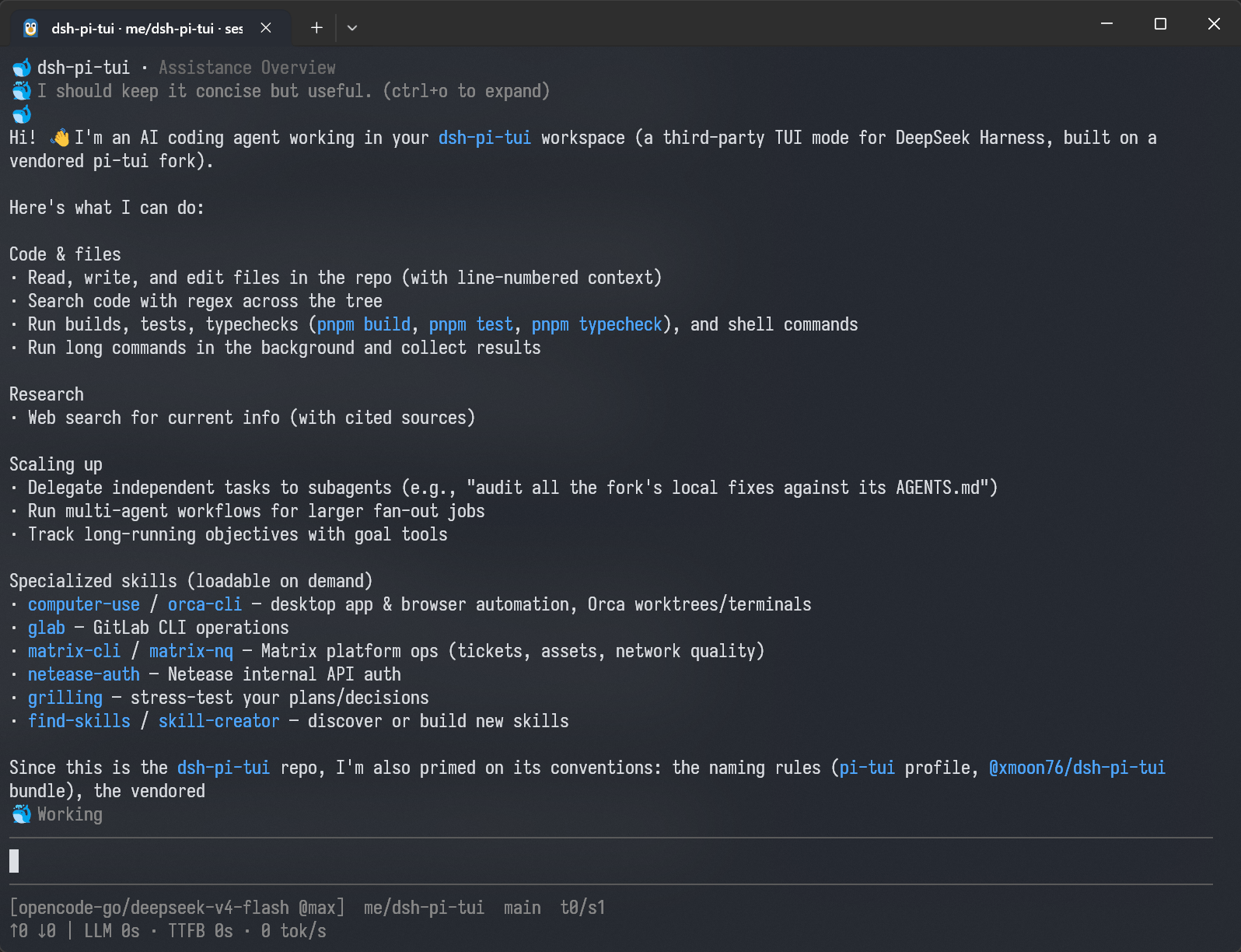
A third-party TUI mode for DeepSeek Harness (dsh), built on a vendored fork of pi-tui.
Run dsh --profile pi-tui for a terminal UI instead of the browser GUI (dsh --profile web) or one-shot mode (dsh --profile headless).
Status: working. The TUI covers the main session loop — input → session events,
approvals, commands, session switching and full-text search — plus presets, skills,
model/settings menus, and slash commands. Rendering and input routing are verified
by headless tests (@xterm/headless) with no TTY or model connection needed.
Screenshot
Layout
The full repository layout lives in AGENTS.md (the contributor
operating manual). In one line: packages/pi-tui/ is the vendored@moonshot-ai/pi-tui fork (rescoped to @xmoon76/pi-tui, private, never
published — its divergence ledger lives in packages/pi-tui/AGENTS.md), andpackages/dsh-pi-tui/ is the dsh bundle (@xmoon76/dsh-pi-tui, the only
published package) that bundles the fork into its build output.
Prerequisites
- A DeepSeek Harness installation with profiles support (
dshon yourPATH). - Node >= 22.19 (
^22.19.0 || >=24, same range as dsh). Running from source
needs Node with native TypeScript support (>= 23.6) or the tsx ESM hook
(node --import tsx/esm, how dsh's own source launch works). - pnpm only when installing from source.
Install
dsh plugin runs pnpm inside the target profile's directory, so the usual
pnpm verbs (add, remove, update, list) all work.
Option A — from the npm registry (recommended)
The published package is self-contained: the vendored pi-tui fork is bundled
into its build output, so @xmoon76/dsh-pi-tui is the only package you install
(@xmoon76/pi-tui stays private in this repo, like kimi-code keeps@moonshot-ai/pi-tui private):
# install the bundle into the pi-tui profile (creates the profile if needed)
dsh plugin --profile pi-tui -- add @xmoon76/dsh-pi-tui

# run it
dsh --profile pi-tui
Any dependency whose manifest declares dsh.bundle joins the profile's layer
stack automatically — no manual cordis.patch.yml wiring.
Option B — from source
Build artifacts are not committed (dist/ for both packages is gitignored and
the package exports point at the built files), so build before installing
from a clone:
git clone https://github.com/XMoon/dsh-pi-tui
cd dsh-pi-tui
pnpm install
pnpm build        # pi-tui tsdown (dist/) + dsh-pi-tui tsdown (dist/, bundles pi-tui)

# file: — the bundle is copied into the profile at add time; rebuild + re-add
# to refresh (see "Update / uninstall" below)
dsh plugin --profile pi-tui -- add @xmoon76/dsh-pi-tui@file:$PWD/packages/dsh-pi-tui

# link: — a live symlink instead; `pnpm build` output is picked up directly
dsh plugin --profile pi-tui -- add @xmoon76/dsh-pi-tui@link:$PWD/packages/dsh-pi-tui
Verify the install
dsh plugin --profile pi-tui -- list          # @xmoon76/dsh-pi-tui present
dsh --profile pi-tui                         # TUI starts instead of the web GUI
Update / uninstall
# registry installs:
dsh plugin --profile pi-tui -- update @xmoon76/dsh-pi-tui
# file: source installs copy at add time — rebuild + re-add to refresh
# (link: installs track the repo live and need only `pnpm build`):
pnpm build && dsh plugin --profile pi-tui -- add @xmoon76/dsh-pi-tui@file:$PWD/packages/dsh-pi-tui

dsh plugin --profile pi-tui -- remove @xmoon76/dsh-pi-tui
Development
pnpm install
pnpm build        # pi-tui tsdown (dist/) + dsh-pi-tui tsdown (dist/, bundles pi-tui)
pnpm test         # pi-tui's own suite (node --test) + dsh-pi-tui headless tests
pnpm typecheck
node --expose-gc packages/dsh-pi-tui/scripts/bench.mts   # performance baseline (optional)
Tests drive the UI through @xterm/headless (see packages/dsh-pi-tui/test/virtual-terminal.ts),
so rendering and input routing are verified without a TTY or a model connection.
Development history (dogfooding)
This project started development on the browser surface (dsh --profile web) and
switched to building itself with itself: since August 15 2026, all fixes and
features are developed inside this TUI, the same way this README and the
codebase are maintained. The dev loop runs on a dedicated pi-tui-dev profile
installed with Option B's link: specifier
(dsh plugin --profile pi-tui-dev -- add @xmoon76/dsh-pi-tui@link:$PWD/packages/dsh-pi-tui)
— a live symlink, so pnpm build is picked up without re-adding — while thepi-tui profile stays on the published registry package for real use.
Slash commands (selection)
/sessions [query]— open the session picker: search-as-you-type over
session ids, titles, and workspaces, rows grouped by workspace with livefiltered/totalcounts, and titles loaded in the background as they are
read. Enter switches to the selected session./search <query>— full-text search over persisted session logs, then
switch to a hit./title [title]//rename [title]— with an argument, set the current
session's title (pins it against automatic generation; titles appear in
the/sessionspicker); without an argument, regenerate the title from
the conversation — this overwrites the current title, including one you
pinned earlier./yolo— switch todanger-full-access(alias of/permission danger-full-access)./queue— per-item queue management: edit, delete, steer one, or insert a
message into the agent's inbox (the queue pane above the editor shows
pending messages;Ctrl+Ssteers them all at once,Alt+↑pulls them all
back into the editor)./status— show the current session's stats and identity (turn counts,
token usage, workspace, installed dsh version)./preset,/model,/settings,/export,/fork,/subagents— seedsh --profile pi-tui's command autocomplete (/+ Tab).
Keybindings (selection)
Ctrl+F— toggle transcript search (the/search <query>overlay; a
second press closes it).Shift+Tab— cycle the permission preset (read-only → workspace-write →
danger-full-access); the footer's mode slot badges every preset
([workspace-write]/[read-only]/[custom], with[yolo]flagging
the no-approval mode).Ctrl+S— steer: with queued messages, sends the whole queue (plus the
draft, if any) into the running turn at once; otherwise sends the draft
alone. An idle agent starts a fresh turn with everything.Alt+↑— dequeue: pull every queued message back into the editor draft.Ctrl+T— toggle the full todo list; the dock above the editor always shows
the todo summary and background tasks, and queued input renders between
them.@— file/folder mentions in the editor:@+ Tab completes files from the
whole workspace (fd-backed whenfdis on PATH, with a built-in recursive
fallback otherwise). The literal@pathis submitted and the model reads
the file itself. With background work running, an empty editor's↓orCtrl+Jopens the task browser over both surfaces:- subagent rows (live continuable children) —
Enteropens the child's
transcript read-only (Escreturns); they never register jobs records, so
this browser is their only glanceable home. - job rows (bash and one-shot subagent jobs) —
Entershows the status
viewer only: a bash job's output read cursor belongs to the model'sjob_output, and a one-shot subagent job record carries no child session
id, so the transcript is reached via/subagents(sstops a job).
The footer badge shows[N tasks running · M agents · ↓ view]while any
background work is live.
- subagent rows (live continuable children) —
Launch options
The TUI's startup row adds --preset <id> — the agent preset a fresh
session starts on (falls back to $DSH_PI_TUI_PRESET, then the saved
settings default). It exists because /preset only applies to a blank (not
yet created) session, so launch-time selection is the other half of choosing
a preset. All other flags are the dsh runner's own (--session <id>, …).
Session lifecycle
Opening the TUI with no --session creates no session at all: the first
user message (text, slash command, Ctrl+S steer, or ! shell) starts it
lazily. --session <id> still resumes immediately, and a local !! command
runs without needing a session.
Verified in the P0 spike
- Vendored pi-tui: the fork's own suite passes under
node --test(run it as
the sync gate after every re-vendor; the count is deliberately not copied here —packages/pi-tui/package.jsonis the single source of version facts). TuiApprenders, accepts editor input, and handles Ctrl+C on a headless xterm.- The whole import chain (pi-tui, tui-app,
@deepseek-ai/dsh-cmdline, commander)
loads under the tsx ESM hook — the dsh source-launch contract. - Native modifier-key addons are optional: on Linux the loader returns
undefined
without attempting a load, and the non-TTY stdin path is guarded.
Safety & operational notes
- One surface per session. dsh has no cross-process session coordination:
a session open in TWO dsh processes (TUI + web, or two TUIs) can corrupt its
log. The TUI refuses to open a session already held by another live dsh
process (anowner.lockfile next to the log, with a pid/starttime probe
for stale locks left by crashes — so the second surface is stopped at
OPEN time, not after the damage). For writes, the TUI detects the other
writer and blocks the send; the SAME action pressed again (Enter for a
submit, Ctrl+S for a steer, unchanged draft) forces through — an edited
draft, a swapped key, a new file revision, or a session switch invalidates
the force. Never run two surfaces on one session (full contract:docs/concurrency.md). - Session repair.
node_modules/@xmoon76/dsh-pi-tui/scripts/repair-session.mjs
repairs corrupted logs (--scanlists damage read-only;--yesapplies with
a mandatory backup). A torn (truncated) tail is truncated at the last
complete frame and reported with exact byte accounting; references to a
duplicated seq are never auto-resolved — the repair refuses and asks for--duplicate-reference=first|last|segment. Repaired logs are re-verified
with the dsh reader's own layout checks before the backup is considered
redundant. (Full repair contract, incl. the frame-layout constraint:docs/repair-session.md.) - Exit.
/exit(alias/quit) flushes the session with a 10s hard
timeout: a hung provider cannot trap the TUI. If the flush fails or times
out, the terminal prints a warning (the tail may not be persisted) and the
process still exits. - Performance.
scripts/bench.mts(non-default) measures ingest,
projection, cold/warm rebuilds, streaming frames, theme switches, and heap;
the saved baseline lives indocs/perf-baseline.md. Unchanged transcript
messages reuse their rendered components, so the warm per-frame rebuild
does not grow with history.
License
MIT. packages/pi-tui retains its upstream MIT license and authorship
(Copyright (c) 2025 Mario Zechner; Moonshot AI fork).